React (Vite)
Install the Selgeo tracking snippet in a React single-page application built with Vite. The recommended path is a plain <script> tag in index.html — the same one-liner the dashboard renders. A fallback useEffect-based injection is documented at the end of this page for projects that cannot edit index.html.
API Version: v1
If you are not on Vite + React, see the HTML / plain-script guide, the Next.js guide, or the WordPress guide instead.
Why index.html?
In a Vite SPA, index.html is the canonical entry point: it is shipped to the browser before any React code runs, every route is served from the same file, and the browser handles <script> deduplication automatically. Placing the snippet here means:
- The snippet is available before React hydrates, so an initial
?ref=…is captured even on a cold cache. - No
useEffect, no double-mount risk, no React Strict Mode surprises. - A single source of truth — no need to remember to inject the snippet in every layout component.
Because the snippet is cookieless and sessionStorage-based, it is safe to load on every page of a Vite SPA without changing how your React app behaves.
Installation — Recommended path
Step 1: Open index.html
Vite projects keep index.html at the project root (next to vite.config.ts), not inside public/. Open it in your editor.
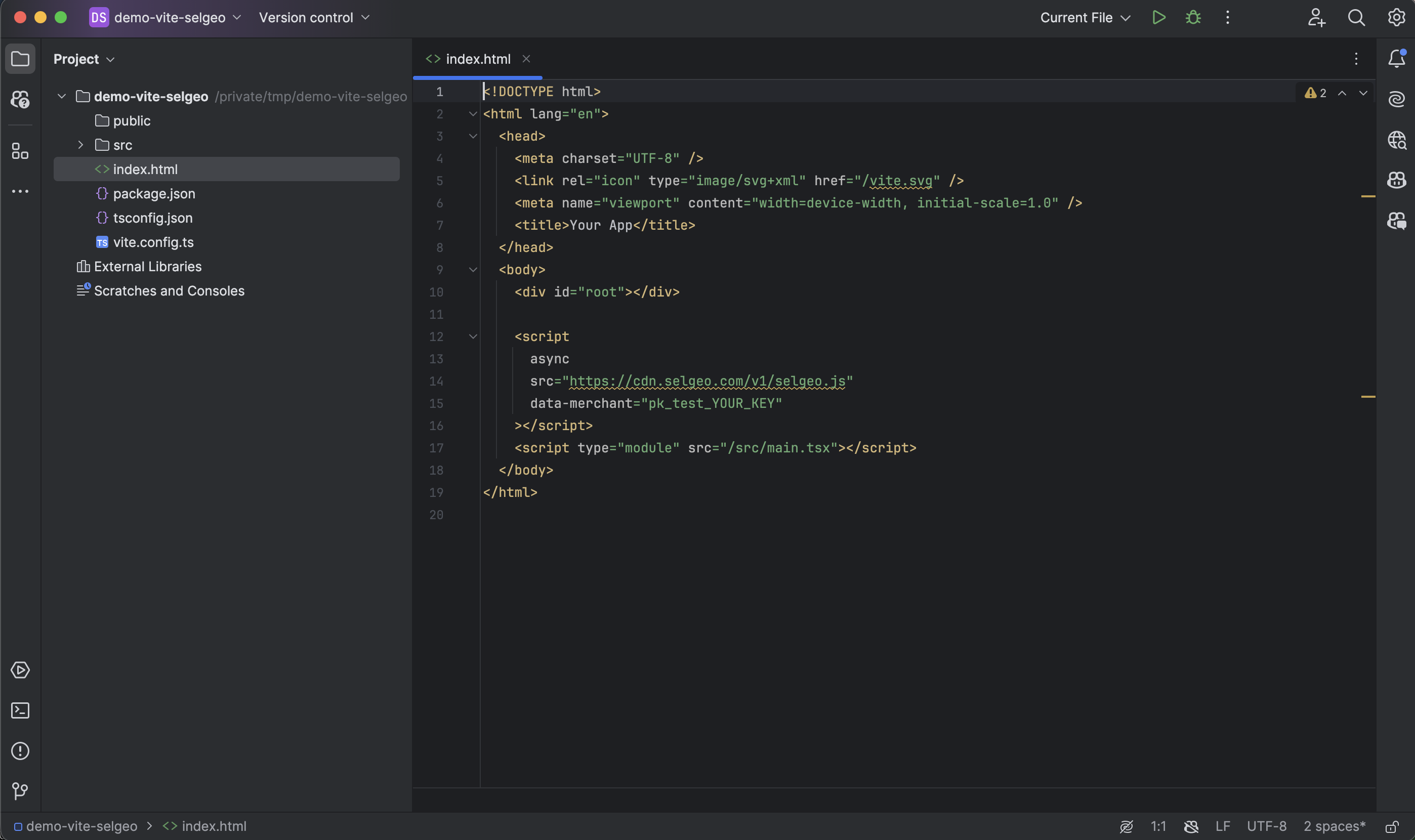
Step 2: Add the snippet before your app module
Place the Selgeo <script> before <script type="module" src="/src/main.tsx"></script> so the snippet's async request is in flight before the React app module starts evaluating. This is what lets Selgeo see the initial ?ref=… on first paint, before React, the router, or any client-side rewrite touches the URL.
<!DOCTYPE html>
<html lang="en">
  <head>
    <meta charset="UTF-8" />
    <title>Your App</title>
  </head>
  <body>
    <div id="root"></div>

    <script
      async
      src="https://cdn.selgeo.com/v1/selgeo.js"
      data-merchant="pk_test_YOUR_KEY"
    ></script>
    <script type="module" src="/src/main.tsx"></script>
  </body>
</html>
Replace pk_test_YOUR_KEY with your public API key from Settings > API Keys in the Selgeo dashboard.
Step 3: Restart the dev server
pnpm dev
# or
npm run dev
Vite picks up index.html changes on cold start. Hot-module-reload occasionally misses HTML edits, so a restart is the safest course.
Required and optional attributes
| Attribute | Required | Description |
|---|---|---|
src | Yes | CDN URL. Always https://cdn.selgeo.com/v1/selgeo.js. |
data-merchant | Yes | Your public API key (pk_test_* or pk_live_*). |
async | Yes | Asynchronous loading; does not block React hydration. |
data-debug | No | Verbose console logging. Remove before going live. |
data-api-url | No | Overrides the API endpoint. Only present for staging / development workspaces — the Selgeo dashboard injects it automatically when needed. |
Single-page navigation
The snippet listens to popstate, history.pushState, and history.replaceState. If you use TanStack Router, React Router, or any other client-side router, no further configuration is needed — a ?ref=… parameter introduced on any route is captured automatically.
Verifying your installation
- Start the dev server (
pnpm dev). - Get a referral link. Tracking links are created by partners in the partner portal (under Links), not in the merchant dashboard. For a quick self-test, sign in to the partner portal as a test partner and create one, or ask an existing partner for their link.
- Open the tracking link in a fresh browser tab:
http://localhost:5173/?ref=YOUR_TEST_REF
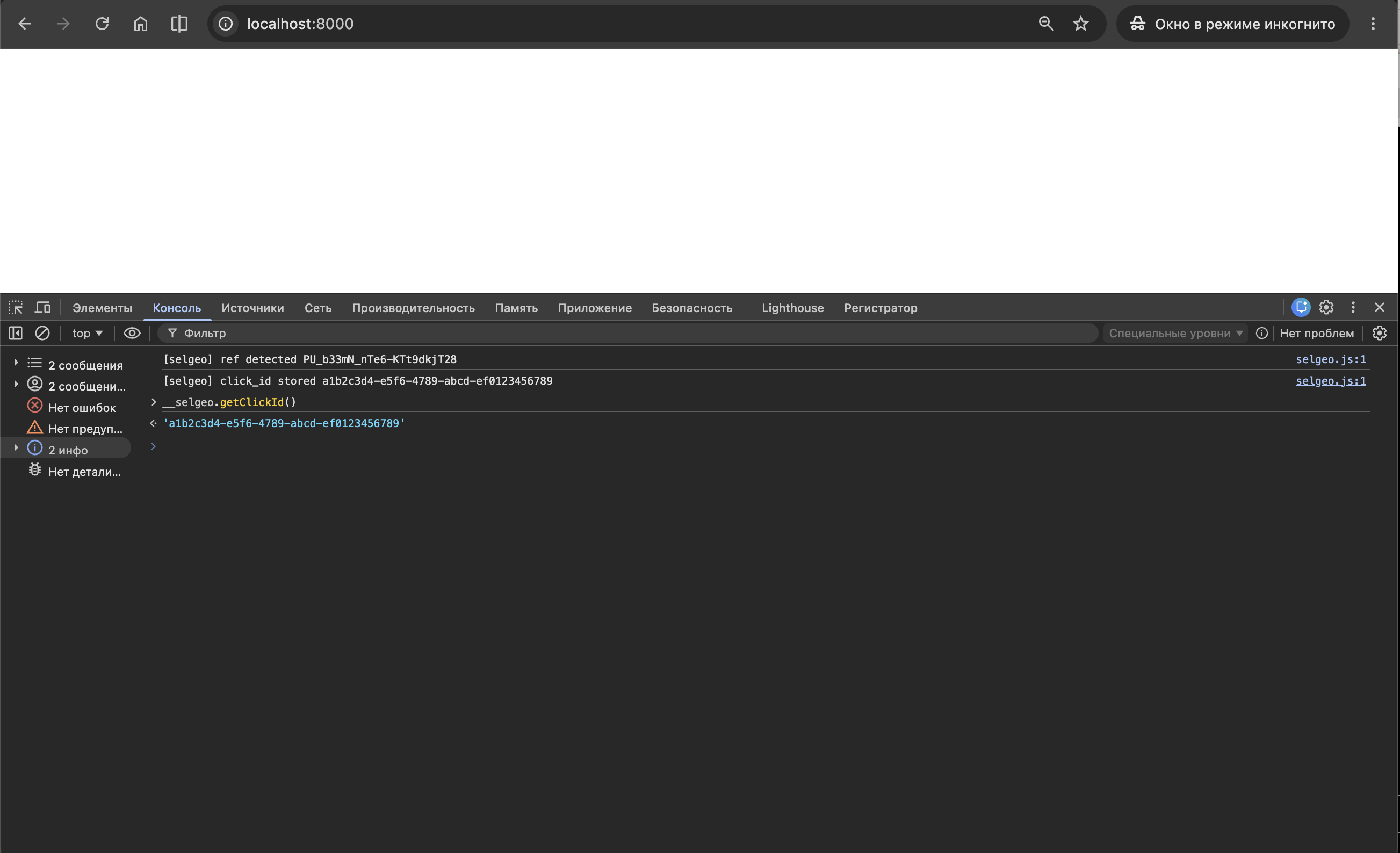
- Open Developer Tools (F12) and check the Console. With
data-debugadded temporarily, you will see:[selgeo] ref detected YOUR_TEST_REF[selgeo] click_id stored xxxxxxxx-xxxx-xxxx-xxxx-xxxxxxxxxxxx - Run in the console:
This should return a UUID string.__selgeo.getClickId()
- Open the Selgeo dashboard. The click should appear under Analytics within a few seconds.
Alternative: useEffect-based injection
Use this path only if you cannot edit index.html — for example, if your index.html is generated by a higher-level framework, or you are embedding the snippet inside a micro-frontend you do not own at the HTML layer.
This pattern carries one extra concern: in React 18+ Strict Mode (default in Vite templates), effects run twice in development. Without a guard, the snippet would be injected twice and a duplicate click might be registered. Use a stable element id plus a document.getElementById short-circuit:
// src/components/SelgeoSnippet.tsx
import { useEffect } from 'react';

const SELGEO_SCRIPT_ID = 'selgeo-snippet';

export function SelgeoSnippet() {
  useEffect(() => {
    if (document.getElementById(SELGEO_SCRIPT_ID)) {
      return;
    }

    const script = document.createElement('script');
    script.id = SELGEO_SCRIPT_ID;
    script.async = true;
    script.src = 'https://cdn.selgeo.com/v1/selgeo.js';
    script.setAttribute('data-merchant', 'pk_test_YOUR_KEY');
    document.body.appendChild(script);
  }, []);

  return null;
}
Mount <SelgeoSnippet /> once near the root of your component tree (typically in App.tsx, alongside your router provider).
Why the guard matters:
- React 18+ Strict Mode intentionally double-invokes effects in development to surface side-effect bugs.
- Without the
document.getElementByIdshort-circuit, two<script>elements would be appended, both would execute, and the snippet would register two clicks for the same visitor. - The stable
id="selgeo-snippet"lets the guard work across hot-reloads, route changes, and component remounts.
This pattern is also useful when consent management or feature flags must gate the snippet load — wrap the effect body in your conditional.
Troubleshooting
Snippet not loaded
- Confirm the
<script>is inside<body>, not<head>(Vite'sindex.htmlshould already have<body>). - Run
pnpm buildand inspectdist/index.html. The snippet should appear in the built HTML. - If you use a custom Vite plugin that rewrites
index.html, ensure it preserves user-added<script>tags. - Check the browser Network tab for the
selgeo.jsrequest — a CORS or CSP error indicates a configuration issue (see below).
Click not tracked
- The visitor must arrive with
?ref=…on the initial page load. The snippet rewrites the URL on capture, so reloads strip the parameter — issue a fresh tracking link if you have already consumed the current one. - Verify
data-merchantcontains a validpk_test_*orpk_live_*key. - If you use the
useEffectalternative, confirm thedocument.getElementByIdguard is in place andSELGEO_SCRIPT_IDis unique on the page. - Check the dashboard mode (test vs live) — a mismatch silently drops the click.
CSP blocking
If you set a Content-Security-Policy via a Vite plugin, meta tag, or origin server, allow the Selgeo origins:
script-src 'self' https://cdn.selgeo.com;
connect-src 'self' https://app.selgeo.com;
For staging / dev workspaces where data-api-url points elsewhere, add that origin to connect-src as well.
Next steps
- Stripe Payment Links — zero-backend Stripe integration.
- Stripe Checkout — pass
click_idto Checkout Sessions from your server. - Conversion API — track non-Stripe conversions.
- Snippet Setup — full attribute reference and the underlying HTML script tag.